
The SKINR Studio: Your Ships, Live in 3D
Your SKINR collection, the Paragon Hub, and EVE ships themselves in a fully interactive 3D viewer -- rendered locally with CCP's own Trinity engine and the game's own materials.
For everyone.
EveLens 1.5.0 is our biggest release yet.
The new SKINR Studio brings your SKINR collection, the Paragon Hub, and EVE ships themselves into a fully interactive 3D viewer — rendered locally on your PC using CCP's Trinity technology and EVE's own ship assets and materials.
Rotate the ship. Zoom in. Change the lighting. Browse designs you own. Preview designs you don't. Build a fleet and take the screenshot.
For years, third-party EVE tools could show you information about a ship, or at best a static image of one.
Now EveLens can show you the ship itself.
The Postcard Problem
SKINR is built around one thing: how your ship looks.
Yet outside the EVE client, there has never been a particularly good way to explore that.
Your collection could be listed. A design could be represented by a thumbnail. Paragon Hub listings could show you what was for sale. But if you actually wanted to inspect a design from different angles, or see how its materials behaved under different lighting, you had to open EVE and use the in-game studio.
That limitation always felt especially strange for a system as visual as SKINR.
So for EveLens 1.5.0, we went considerably further.
In July 2026, Carbon — the technology framework behind EVE Online, including Trinity, its rendering engine — was released as open source under an MIT license. EveLens now runs that engine headlessly, outside the EVE client, and uses it to build and render EVE ships with the game's own geometry, textures, and nanocoating materials.
The result is not a prerecorded animation or a sequence of screenshots.
It is a live 3D ship.
02Your SKINR Collection in 3D
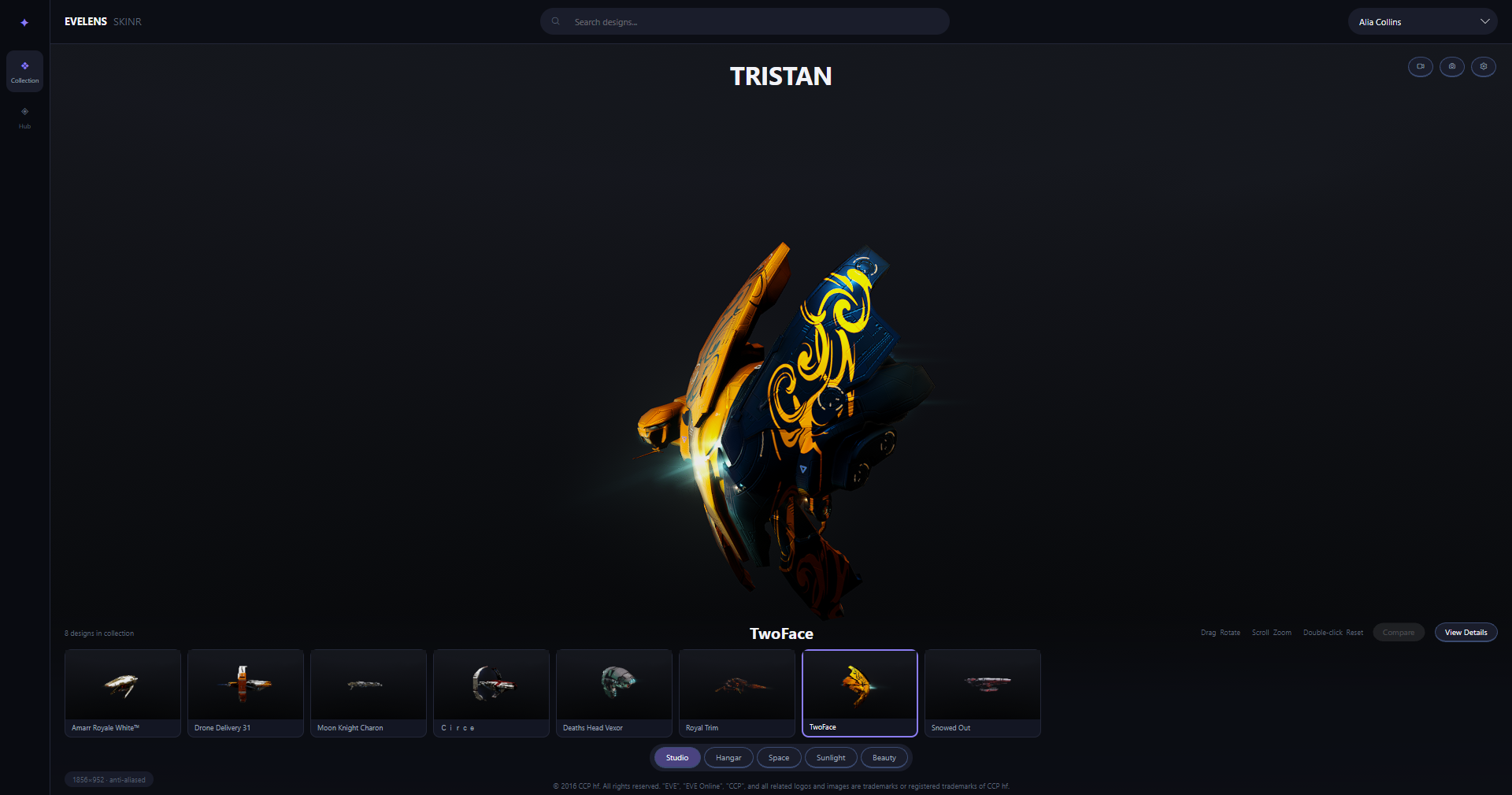
Open the Studio from Tools → SKINR Viewer, choose a character, and EveLens loads their SKINR collection.
Select a design and the ship is staged immediately.
Drag to rotate it. Scroll to zoom. Switch designs without leaving the viewer.
Your collection sits along the bottom of the studio, searchable and ready to browse, so moving between ships feels much closer to looking through a collection than navigating a database.
And your own designs are only the beginning.
03Browse the Paragon Hub
The Paragon Hub is built directly into the Studio.
You can browse thousands of SKINR designs by ship, class, and faction, then place a listing directly onto the 3D stage — whether you own that design or not.
That means you can inspect a design properly before deciding whether it belongs in your collection.
Turn the ship around.
Look at the hull under different lighting.
See how the nanocoating actually behaves on the ship it was designed for.
Window-shopping now has an actual window.
And the window follows you out of the app: the same market lives in your browser at hub.evelens.dev — every design on the Paragon Hub as a real render, with prices in PLEX and ISK, sales history, and a link for every design you can drop straight into a corp chat.
04Five Ways to See Your Ship
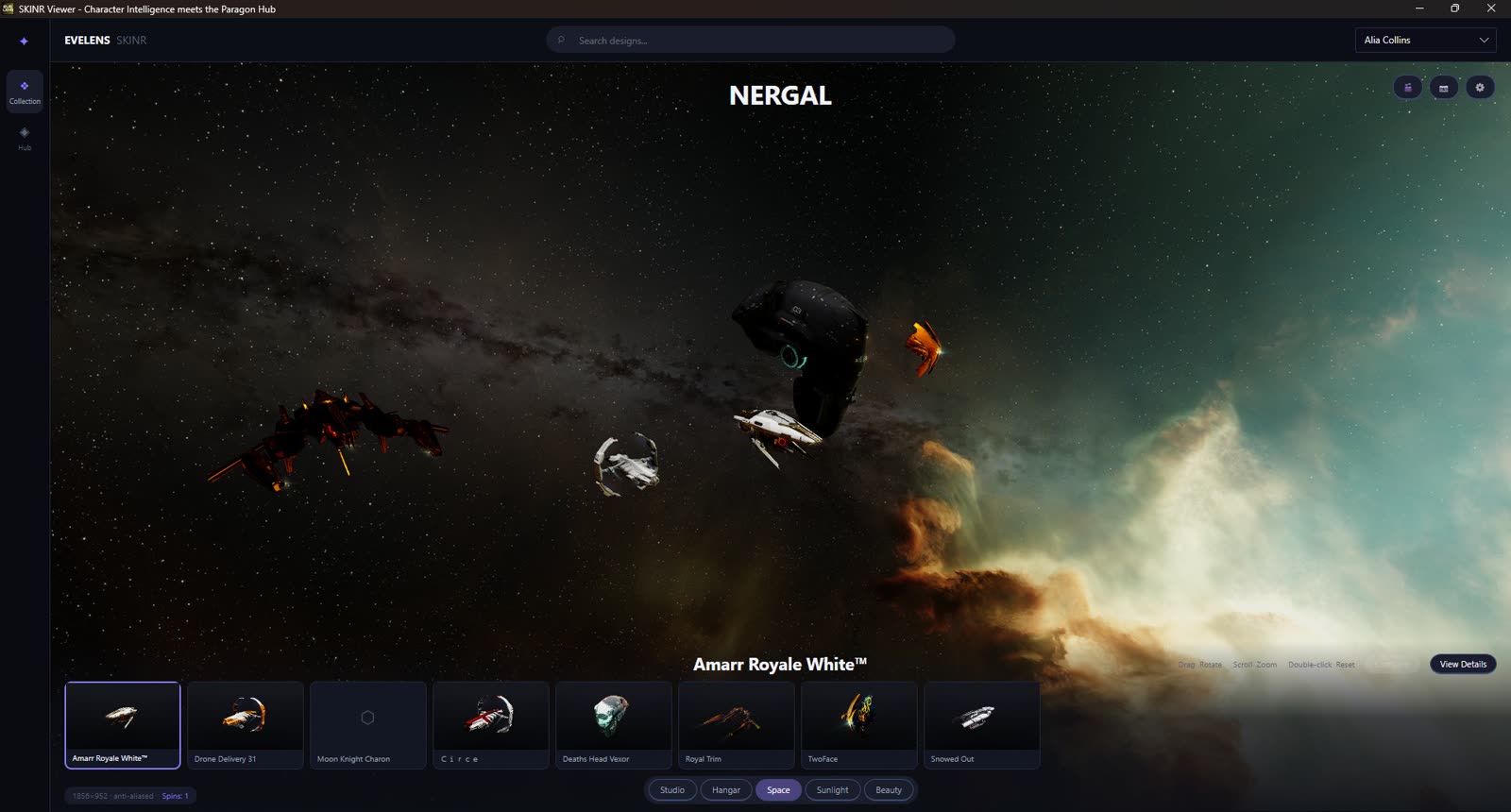
A SKIN can look dramatically different depending on where you see it, so the Studio includes five rendering environments:
Studio gives you a clean presentation environment for inspecting the design itself.
Hangar parks the ship in a real station bay, under its authored industrial lighting. (Supercapitals skip this one — a titan doesn't fit in a station bay, in the game or here.)
Space lets the hull and emissive details stand out against deep-space nebulas — and clicking it again deals the next sky.
Sunlight exposes the materials under strong direct illumination.
Beauty is designed for the screenshots.
Switch between them and you can quickly see how reflective surfaces, metallic coatings, emissive elements, and darker materials respond to completely different lighting conditions.
Why You Can't Spin a Titan
If you've ever wondered why EVE never lets you ship-spin a capital in a hangar — look no further. We finally have the answer, with pictures.
Building the Hangar environment meant putting ships into the game's actual station interiors, including the capital hangars that exist in EVE's own assets. So we did what the game never does: we parked a titan in them and let the camera fly free.
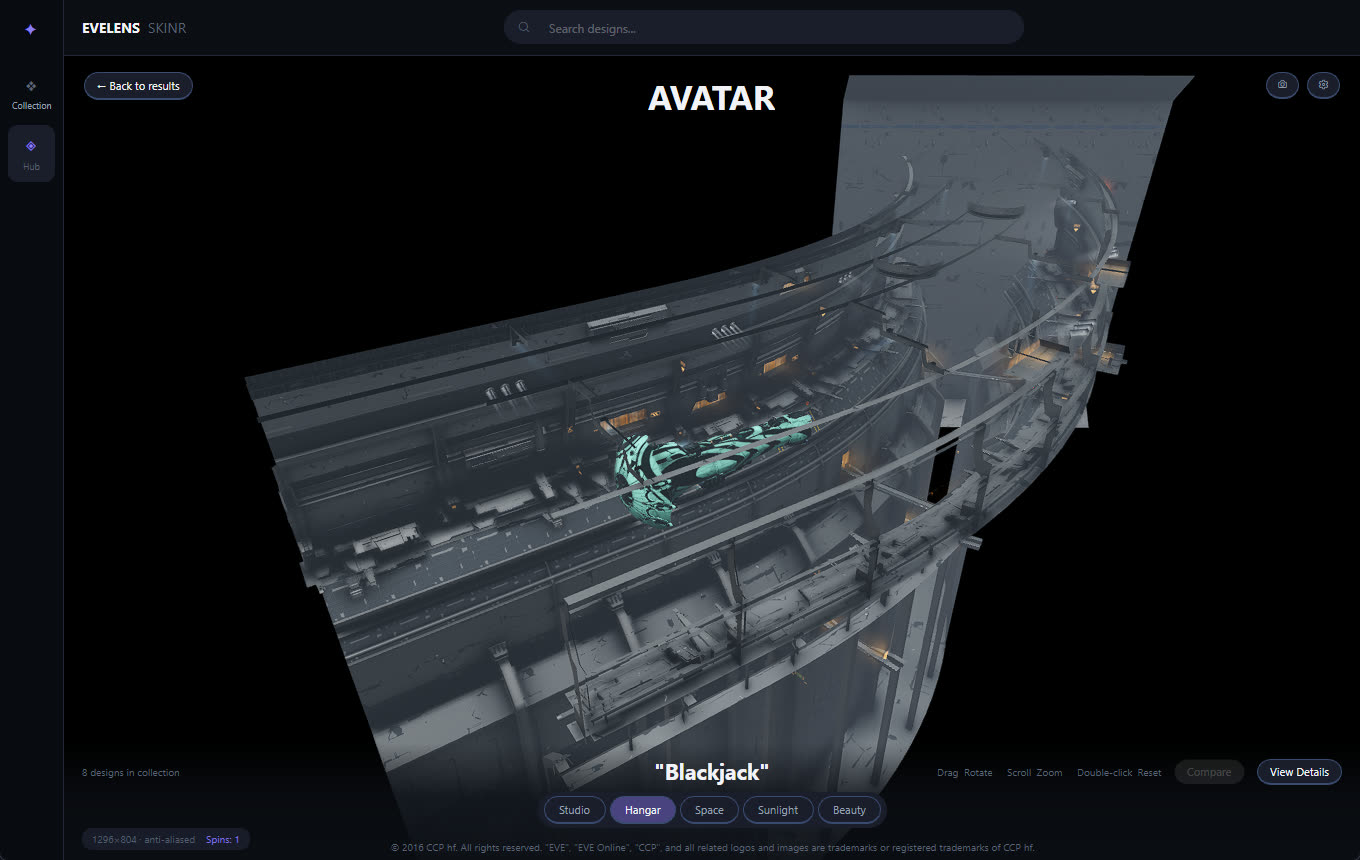
This is what an Avatar looks like inside the modern capital berth:
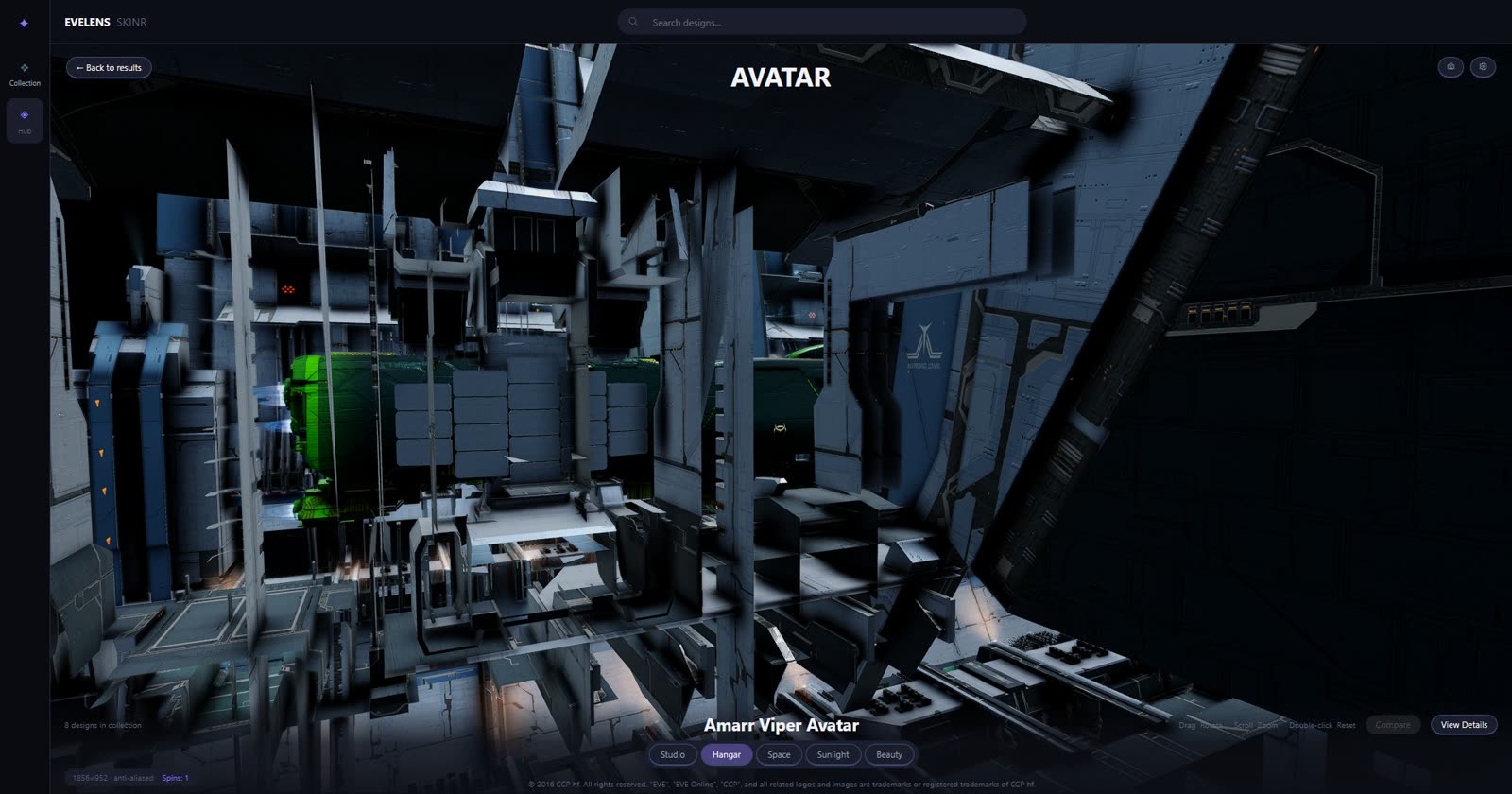
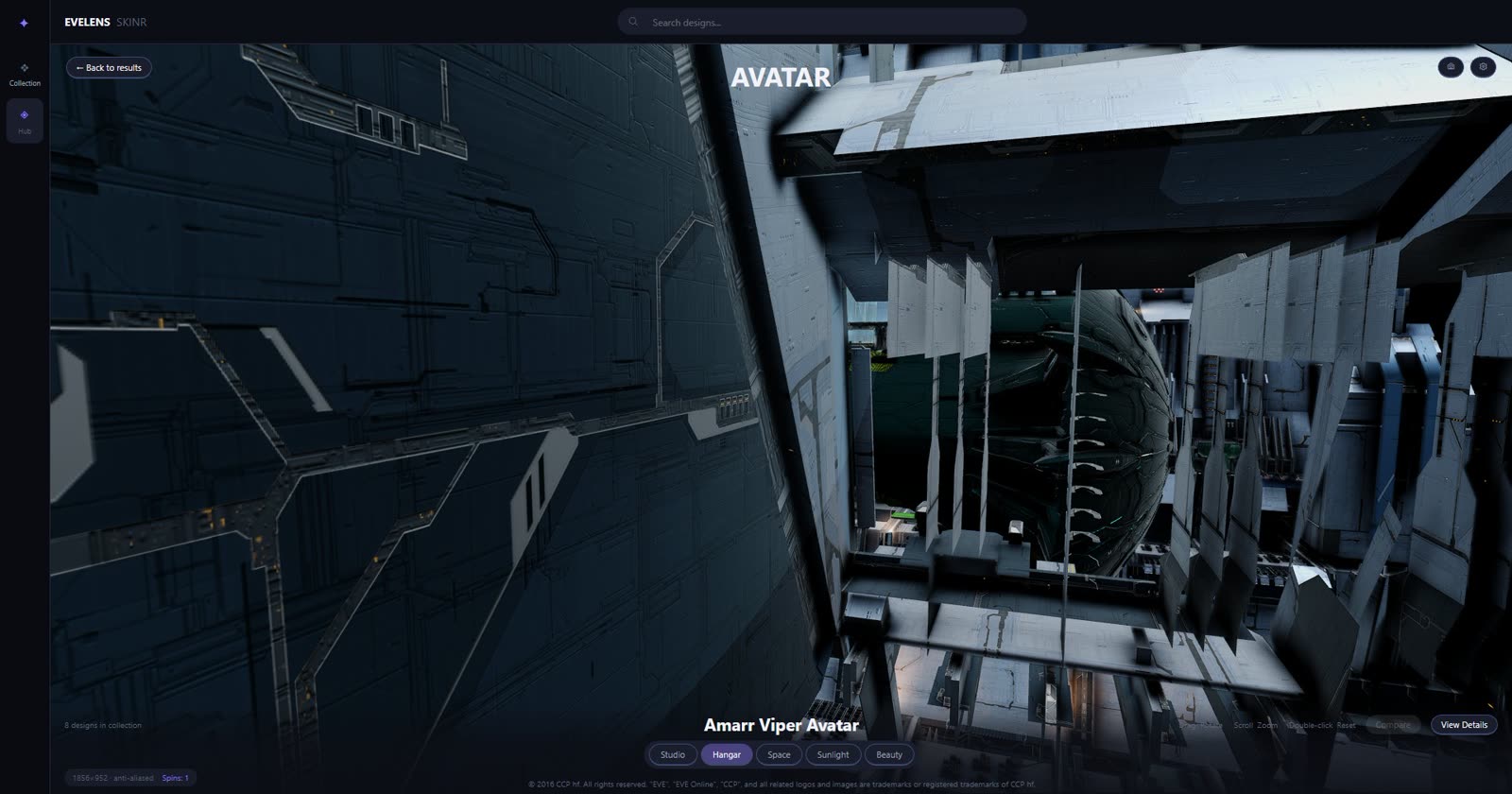
The berth is a pocket, not a room. The dock structures wrap the hull so tightly that almost every camera angle is inside the architecture — and if you pull back far enough to frame the ship, you've already left the building. The interior only exists from the handful of angles the game shows you, because that's all it was ever built for.
The older capital hangar model isn't any kinder:
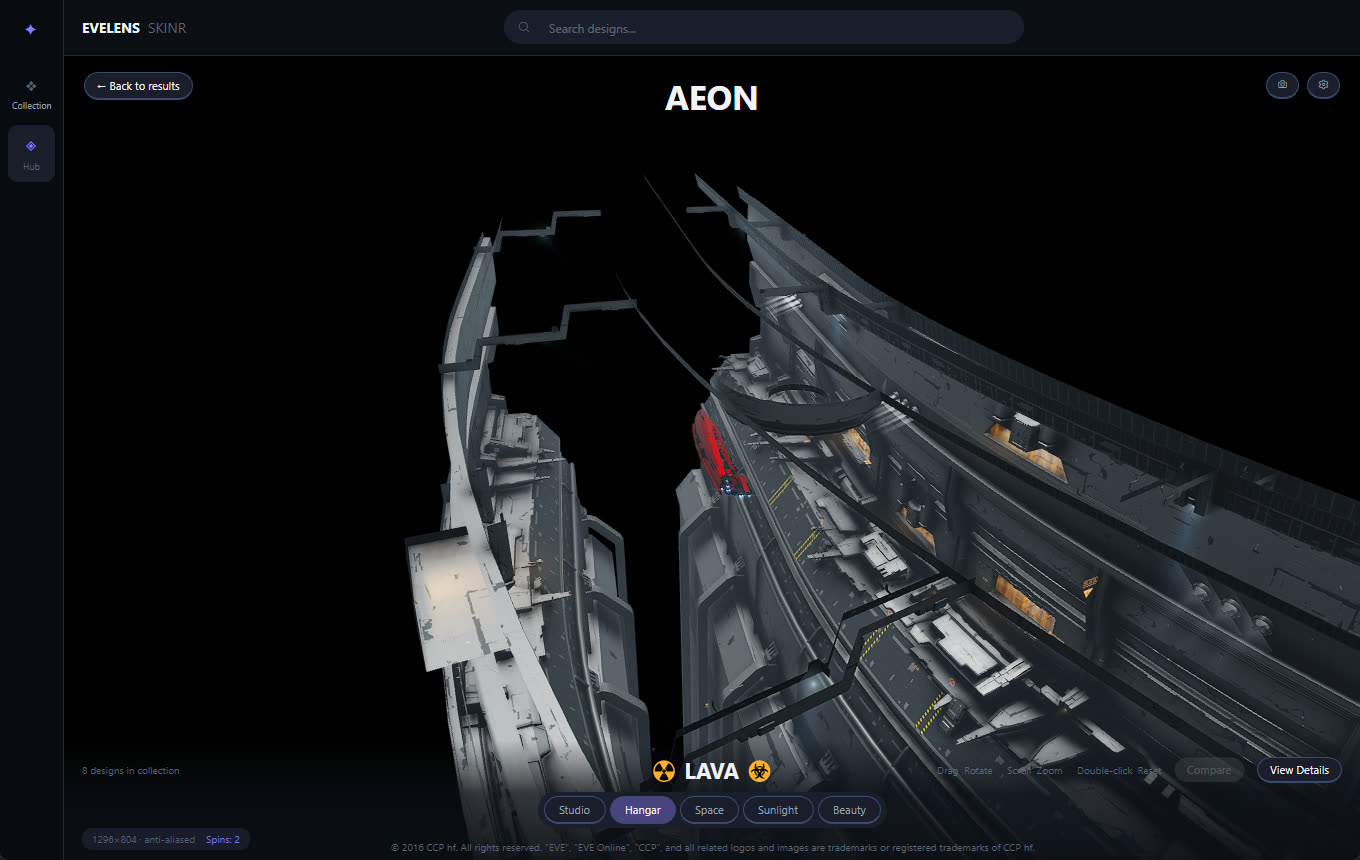
A curved strip of dock, floating in black. Step outside the authored camera path and the walls simply aren't there — station interiors are built like film sets, with geometry that only has a front side.
And one more, because we couldn't resist. Ever wondered how big a titan actually is next to Jita 4-4 — the biggest station model in the game?
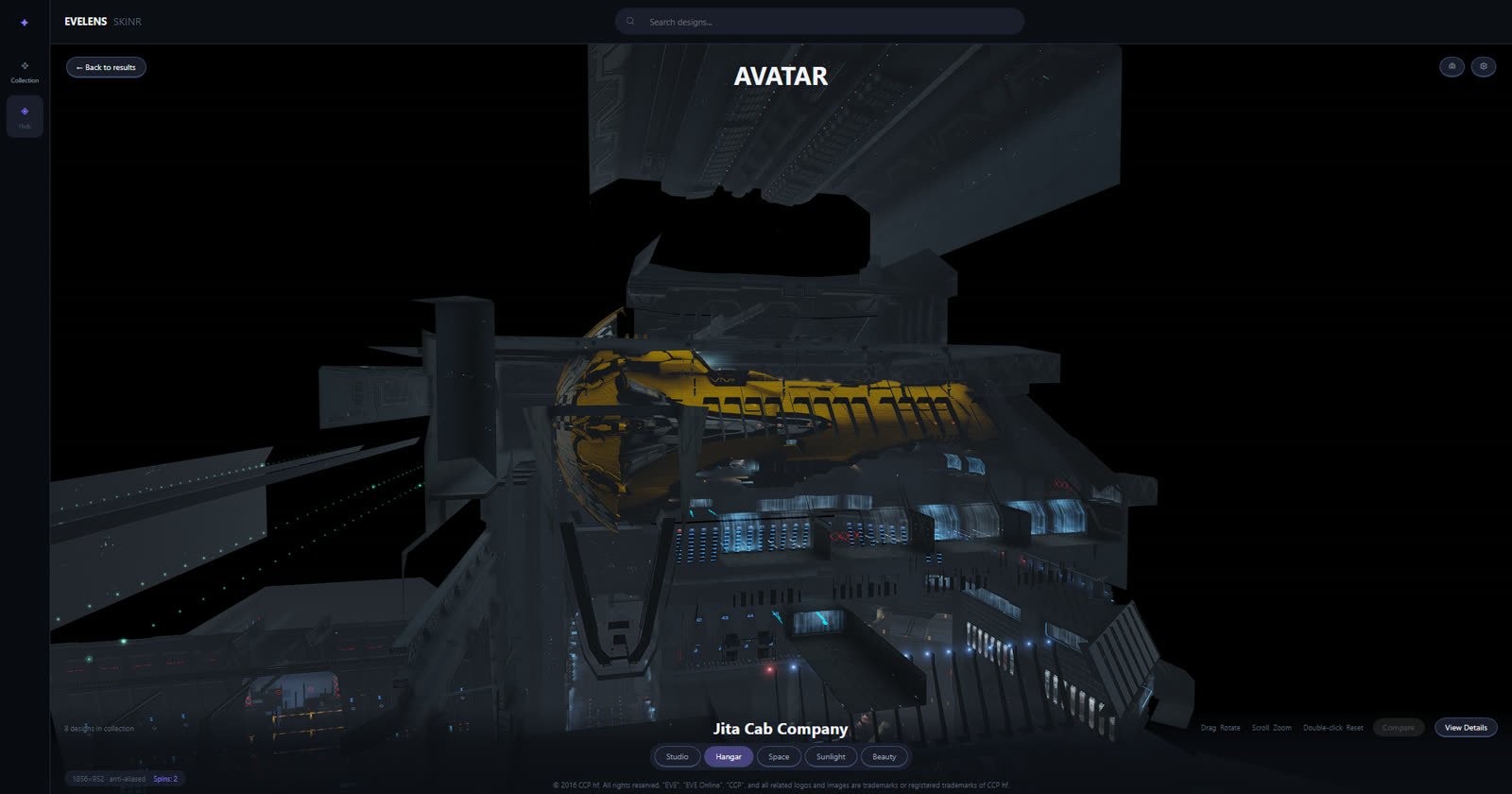
That's not a ship docking. That's a cork.
So the honest answer shipped in 1.5.0: supercapitals don't offer the Hangar environment, because no station bay in the game's assets was ever authored at that scale. Everything else gets the real bay; titans get the respect of not being wedged into one.
Does all this mean EveLens could do full station hangars someday — your ship in the station you're actually docked in? I wanted it. I tried it. Let's just say it's further ahead than currently possible.
06Photo Mode
When you've found the shot, hit photo mode.
The interface disappears and the ship gets the stage.
No collection browser. No controls. No panels.
Just the render.
It is there for wallpapers, corp banners, Discord posts, design showcases, or simply because your ship looks good and you want the picture.
07Photo Op
And sometimes one ship is not enough.
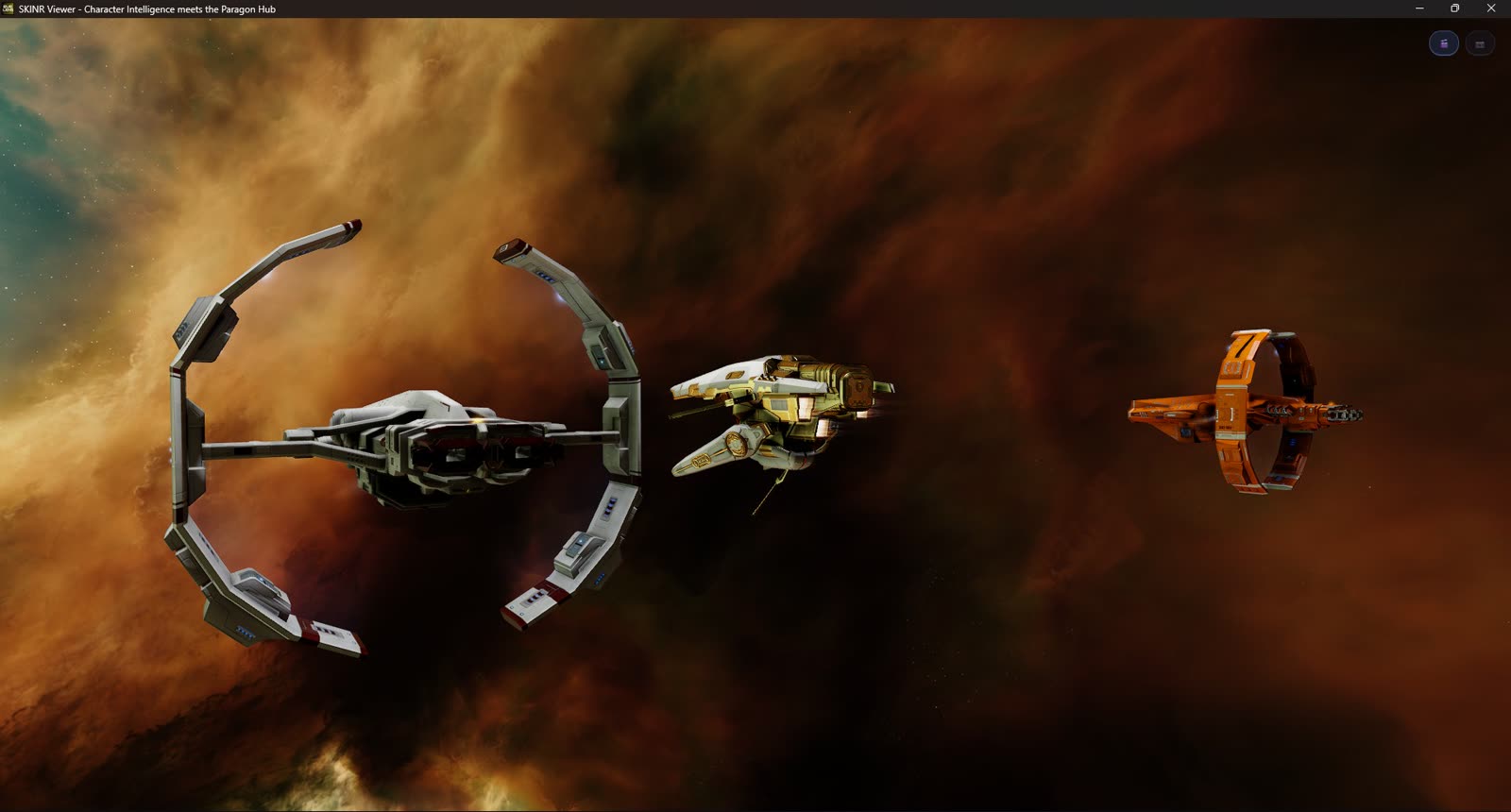
Photo Op stages up to ten of your ships together in formation, out in open space.
Choose the ships, arrange the fleet, hide the interface, and take the shot.
If you've spent months building a SKINR collection across several hulls, you can finally see that collection as a fleet rather than a row of thumbnails.
The Rendering Component
Live 3D rendering is powered by an optional EveLens rendering component.
The first time you open the Studio, EveLens will offer to install it. It is approximately 264 MB, downloaded once and verified before use.
Don't want the additional component? Skip it.
The rest of EveLens continues to work normally, including your SKINR collection, Paragon Hub browsing, listings, and ready-made preview images for thousands of designs. You can enable 3D rendering later directly from the Studio.
09Getting Trinity Running Outside EVE
This feature exists because Trinity and the surrounding Carbon technology were made available to the community.
That opened a door.
Getting through it was another matter entirely.
Trinity was designed to start as part of the EVE client, with years of surrounding engine infrastructure already in place. Running the rendering stack independently meant recreating enough of that environment for ships, shaders, textures, resources, and materials to work correctly without booting the game itself.
The first successfully constructed ship was completely black.
The geometry was there. Running lights worked. The silhouette was unmistakably an EVE ship.
The hull simply refused to be lit.
That problem survived nine investigation sessions.
Another issue quietly caused part of the rendering pipeline to run at roughly one-twentieth of the expected speed. Fixing that one fallback made the initial startup path around 52× faster.
Then came SKINR itself.
Hundreds of nanocoating materials had to render consistently enough that looking at a design in EveLens actually meant something. Metallic response, emissive surfaces, masks, material layers, lighting behavior — "close enough" was not a useful target for something whose entire purpose is visual comparison.
By the time the feature reached release, the experiment folder had passed two hundred scripts.
If you're interested in that side of the project, the longer engineering story is in Running Someone Else's Engine.
10What This Changes
If you collect SKINR designs, EveLens is now somewhere you can actually enjoy the collection rather than simply track it.
If you create or sell designs, players can inspect your work in 3D while browsing the Paragon Hub — in the app, or from a shared link on hub.evelens.dev.
If you're deciding whether an expensive design is worth buying, you can put it on the ship first.
And if you just want to see what an absurdly expensive coating looks like on a hull you have absolutely no intention of purchasing?
Go for it.
That's half the fun.
11Built With the Beta Crew
SKINR Studio went through seventeen beta releases before reaching this one, and it is substantially better because of the people who tested those early builds.
They found empty states we had missed.
Marketplace views that could freeze.
Ships that did not belong in the environments we tried putting them in.
Rendering edge cases.
Workflow problems.
And plenty of smaller things that only become obvious once somebody other than the person building the feature starts using it.
Thank you to everyone who tested, reported, shared screenshots, and kept pushing the feature forward.
Please keep doing it. Bugs and feedback are always welcome on the EveLens issue tracker.
12Available in EveLens 1.5.0
Live 3D rendering launches on Windows with EveLens 1.5.0.
On Apple Silicon, the Studio opens today — collection, Paragon Hub, and preview images all work — while the Metal rendering component is still being finished.
For Windows users, though, the ships are ready.
Open the Studio.
Pick a design.
Spin the ship.
And for once, don't just look at the stats.
Look at the ship.
Fly safe — and look good doing it. o7
EVE Online and all related logos, names, images, assets, and trademarks are the property of CCP hf. EveLens is a third-party application and is not affiliated with or endorsed by CCP Games.